Dashboard Overview
An overview of the main dashboard and its key metrics.
Welcome Page
After onboarding, you’ll land on the Dashboard. You’ll see:
Admin/CS Count
Displays the total number of Admins or Customer Support agents.
Events Count
Shows the total number of events created in the system.
Entries Count
Shows the total number of entries or submissions received.
Sidebar
The Sidebar can be broken down as below:
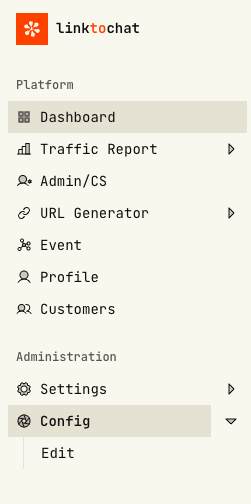
Config.
Access configuration settings for your account or workspace.
Whatsapp Number
Manage and update your WhatsApp connection.
URL Generator
Generate tracking or referral URLs for your campaigns.
Event
Manage your events including creation and editing.
Profile Page
View and edit your profile information.
Traffic Report
Check analytics and traffic metrics for your campaigns.
Customer Report
View customer activity and engagement reports.
Settings
Adjust system settings and preferences.
Logout
Sign out from your account safely.
Last updated on